Independent product · Full stack · Public beta

SplittEZ

Designed, built and operated by me · March 2026 to now · splittez.com

An expense app for personal spending, recurring costs and shared bills. I took it from an empty repository to a public beta on the web, iPhone and Android: the data model, the API, the app, the tests, the phone builds and the server it runs on.

The launch film

A silent preview loops while on screen. Sound starts only when you choose it.

I made the launch film from the app’s own screens, recorded with fictional demo people, so what you see is the product as it runs. It walks through the four things SplittEZ is for.

  1. Expense management for real life
  2. Personal spending: log it as you go, one clear record
  3. Insights and budgets: see the bigger picture, see what’s left
  4. Recurring costs: renewals and free trials before they hit
  5. Shared expenses: split with friends, groups or guests, confirmed on both sides
  6. Work spending, other currencies and attached receipts
  7. Two themes, one standard

The film has no narration. Each scene pairs a short headline with a recording of the matching screen in the light Ivory or dark Obsidian theme, and it ends on the beta invitation at splittez.com.

Paid is not the same as spent

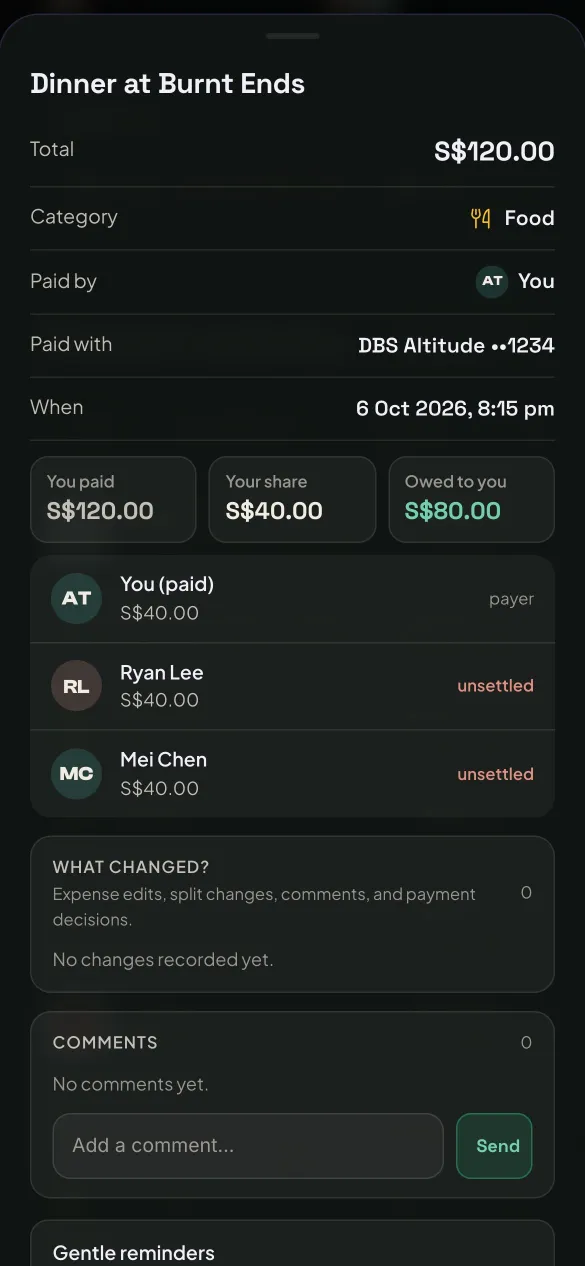
Your bank shows what money moved. It cannot tell you what that money meant. If you pay S$120 for a dinner shared by three people, the bank records S$120 leaving your account, but you only spent S$40. The other S$80 is money you are owed.

Most expense apps pick one side: personal budgeting or bill splitting. People who share flats, eat out in groups and travel together live in both, so their numbers never agree. SplittEZ keeps one ledger that records what moved, what part was yours, who owes whom and how it was settled.

You paid
S$120
You spent
S$40
Owed to you
S$80
SplittEZ expense detail for a S$120 dinner: you paid S$120, your share is S$40 and S$80 is owed to you, with Ryan and Mei marked unsettled

The first market is Singapore (S$, PayNow and PayLah instructions) with India second (INR and UPI). The target user is someone aged roughly 22 to 40 who shares costs often. People who want automatic bank feeds or investment tracking are explicitly not the audience.

What it does today

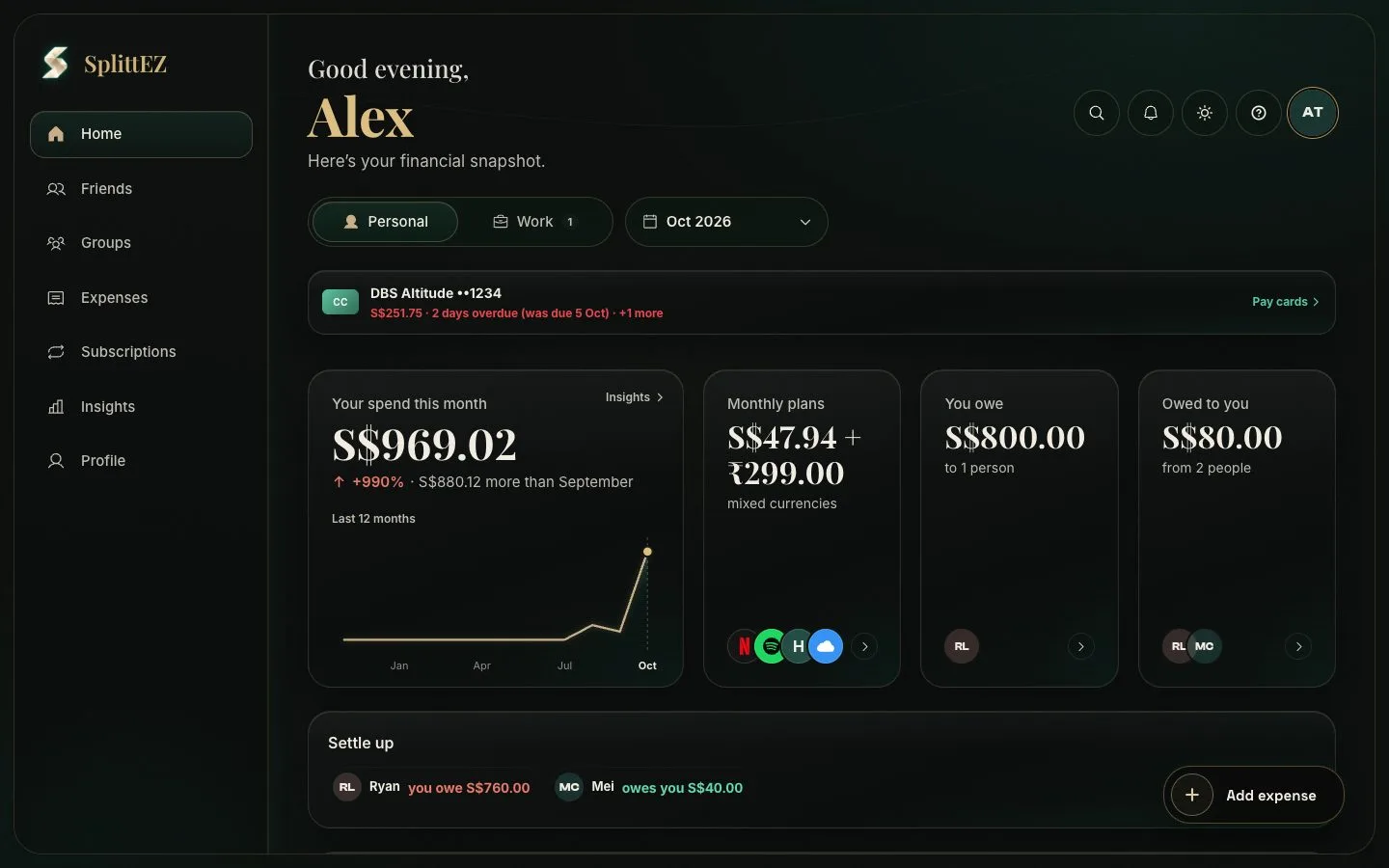
SplittEZ desktop Home: spending this month with a 12-month trend, monthly plans in two currencies, amounts owed each way and settle-up suggestions
HomePersonal and Work kept apart, a card bill reminder, this month’s spend, plans in two currencies and who to settle with.
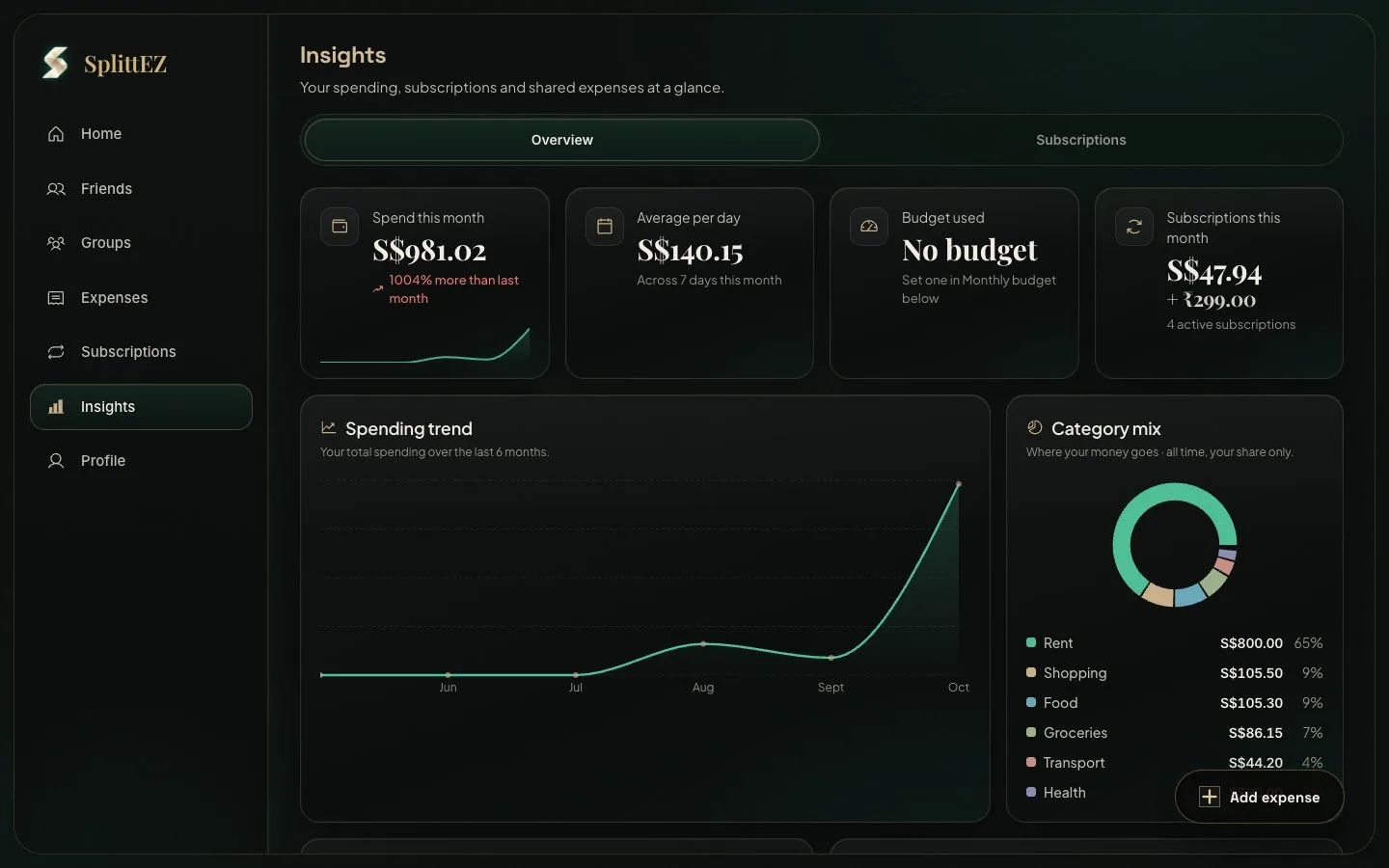
SplittEZ desktop Insights: spend, average per day, budget and subscription tiles above a spending trend and a category mix
InsightsEvery figure counts only your share, so a dinner you paid for shows as S$40, not S$120.
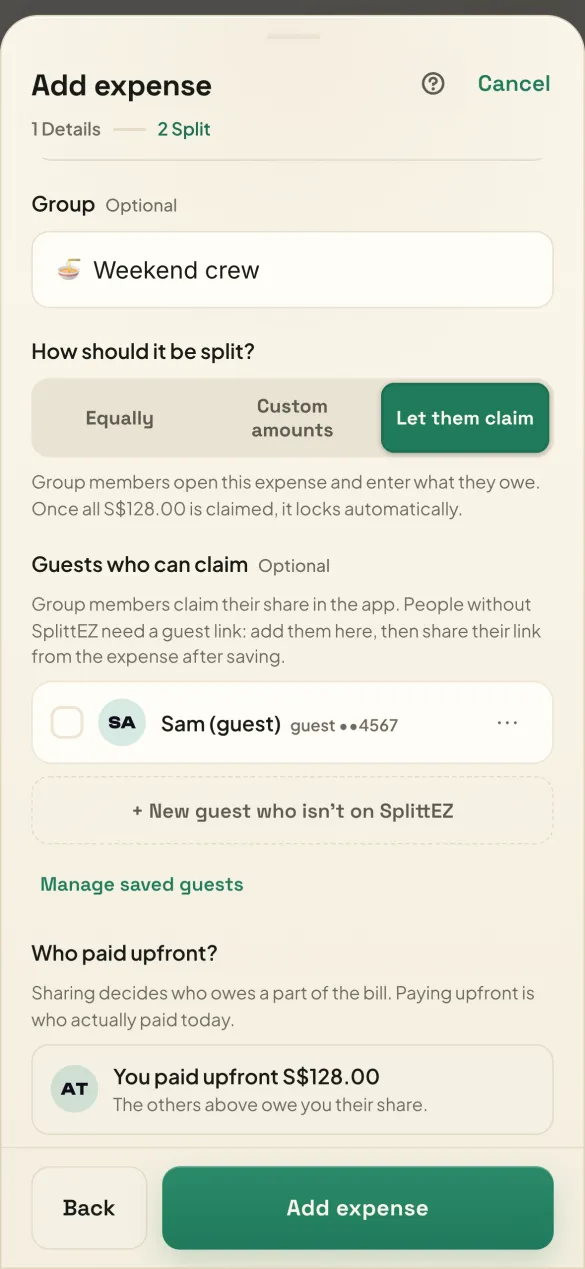
Add expense, split step: options to split equally, by custom amounts or let people claim their share, with a guest who can claim and the upfront payer
Let them claimGroup members and guests claim their own share.
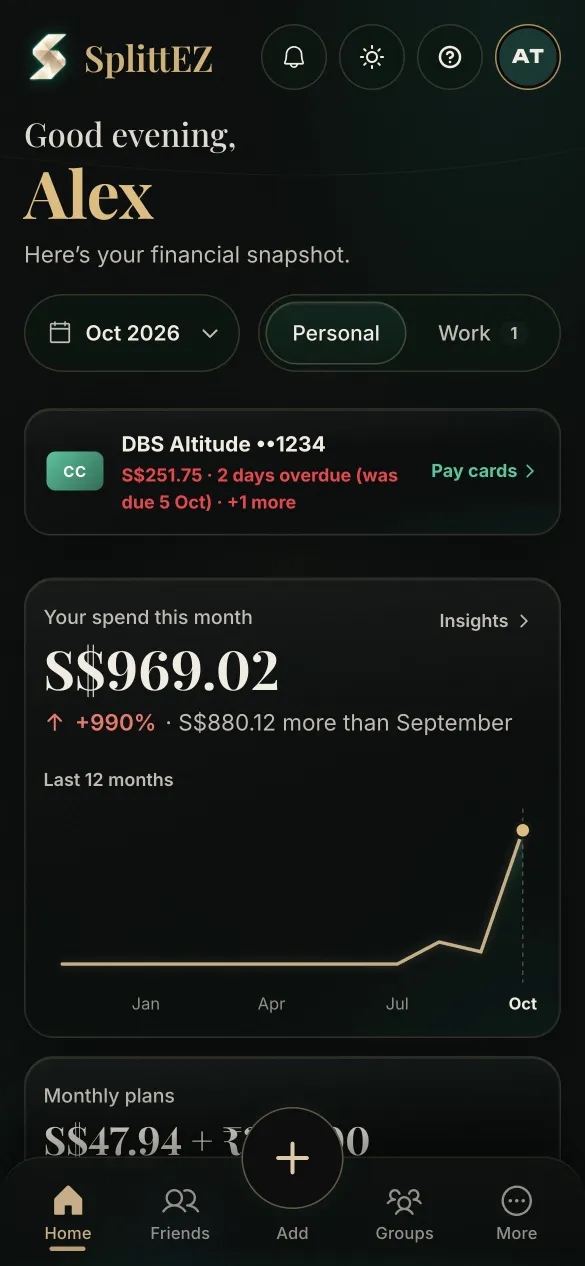
Phone Home screen in the dark theme with this month's spend and a 12-month trend
Home on iPhoneThe same app, packaged natively.
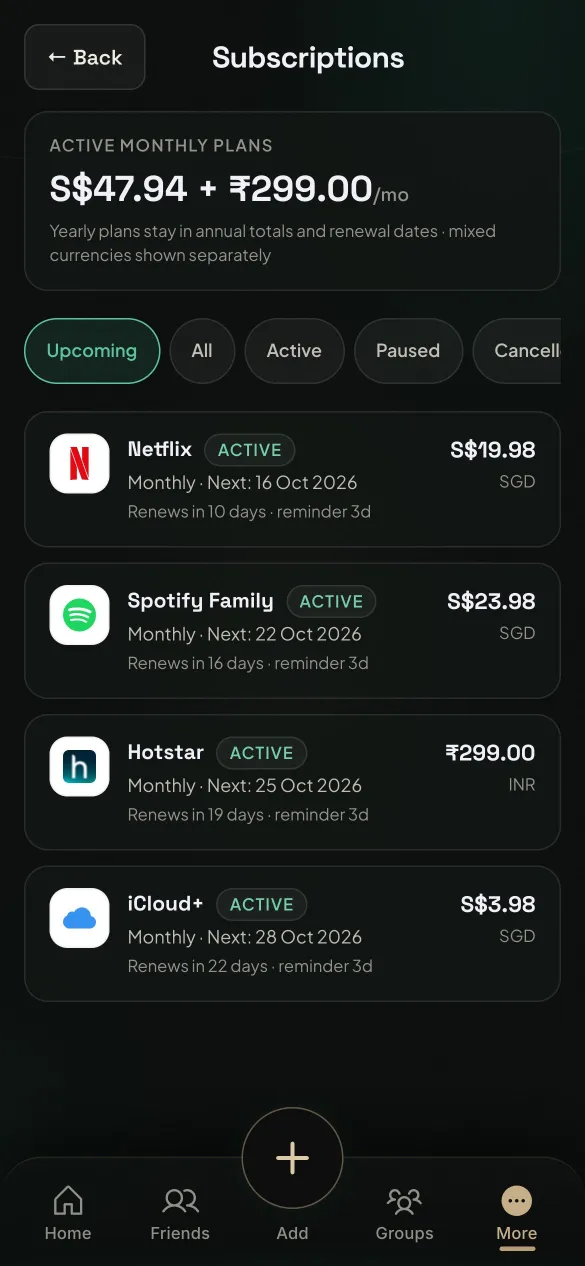
Subscriptions list with monthly plans, renewal dates and reminders in SGD and INR
SubscriptionsRenewals and reminders across currencies.
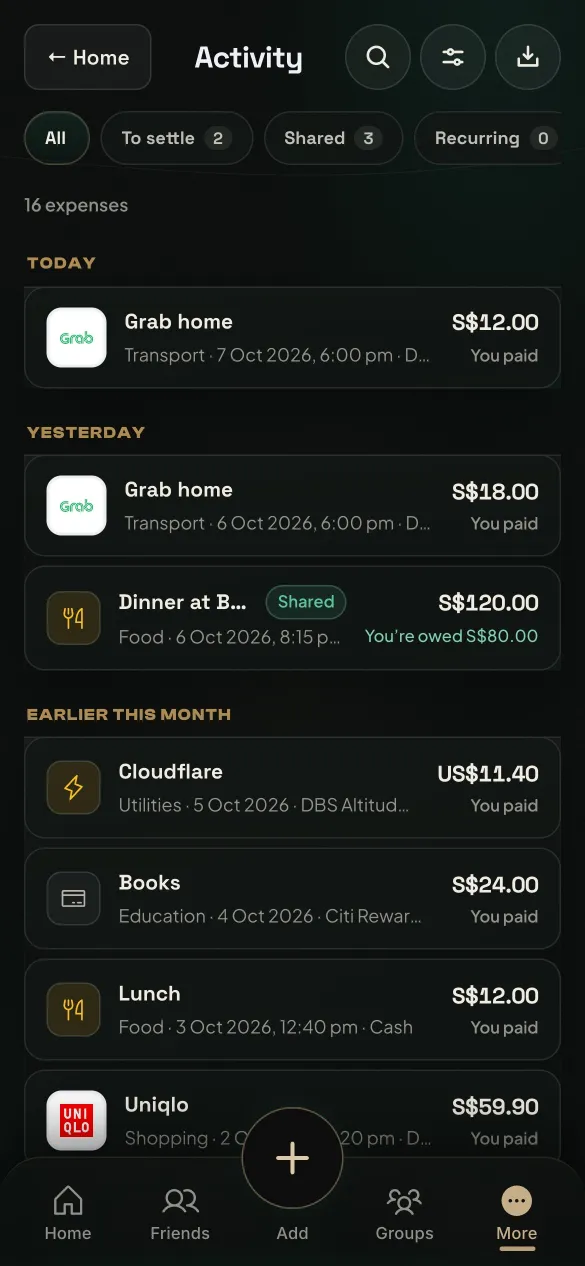
Activity list with filters for to settle, shared and recurring, showing recent expenses and a shared dinner where S$80 is owed to you
ActivityEvery expense with what you paid and what is owed back.

Shipped

  • Personal and work expenses with categories, search, filters, CSV export and PDF reports
  • Splits by equal shares, custom amounts or open claims, across friends, groups and guests without accounts
  • Settlement with “I’ve paid”, confirm or reject, payment proof and reminders, per currency
  • Subscriptions and free trials with renewal reminders, monthly and category budgets, spending insights
  • Multi-currency expenses that record what the bank actually charged, plus FX and bank fees
  • Credit-card statement cycles and due dates
  • Quick add from Siri and Shortcuts on iPhone for personal expenses
  • Offline use with a sync queue and a conflict screen
  • Passkeys, two-step sign-in with recovery codes, Face ID app lock and in-app account deletion

Built but switched off for the beta

  • Receipt reading (on-device OCR with Tesseract). It misread too many totals, so photos now attach without auto-filling.
  • Bank statement import (a DBS/POSB PDF parser, a CSV mapper and a matching engine). It stays off until there is a review screen.
  • Partial payments. The old path changed the share itself, so the server now refuses part amounts until a sound data model is agreed.

SplittEZ never moves money. Payment details such as PayNow, PayLah and UPI are shown as instructions to copy.

Architecture

One React codebase serves every platform. A Node API owns all business rules and talks to Postgres; the clients never touch the database. Services that hold secrets or money logic sit behind the API.

Clients

Web app (PWA)React 18, Vite, Tailwind CSS 4 and a custom design system with dark and light themes
iPhone and AndroidThe same build packaged with Capacitor 8, plus a native iOS App Intent for Siri quick add
Offline layerIndexedDB read cache and an ordered outbox with duplicate-safe replay

API

Node and ExpressAbout 98 routes. Auth with bcrypt, passkeys (WebAuthn) and TOTP. Sessions stored only as SHA-256 hashes
Money rulesInteger-cent splits, settlement locks and one shared function for “my share”
PushSent straight to Apple (APNs over HTTP/2) and Google (FCM v1), without a third-party SDK

Data and services

Postgres 16Row locks and transactions around invites, sign-ups and settlements; nightly encrypted, restore-checked backups
Receipt storageCloudflare R2, encrypted by the API with AES-256-GCM before upload
Email and FXResend for account email; Frankfurter for reference exchange rates, labelled approximate

Hosting started on Vercel, Render and Neon. It now runs as a self-hosted Docker Compose stack (API, web server, Postgres) published through Cloudflare, which gave me control over cost, backups and data location.

Decisions and trade-offs

Migration

Leaving Supabase without rewriting the UI

The first version ran on Supabase. When I moved to my own API, I wrote a Supabase-shaped client adapter so the existing React screens kept working, and imported users with their existing password hashes so nobody had to reset. Trade-off: the generic query endpoint behind the adapter needed table and column allow-lists, and later a block on re-pointing rows to another owner.

Data model

One definition of “my share”

Home, budgets, categories and insights all call one function for personal spend. Totals are always derived from expense rows, never stored, so an edit or delete cannot leave a stale balance behind. Trade-off: more computation per screen in exchange for numbers that always agree.

Correctness

Money in integer cents

Splits are allocated in cents and the payer absorbs leftover cents, so shares always add up to the bill exactly. This is tested across SGD, INR and MYR, S$0.05 bills and groups of 7, 9 and 13.

Concurrency

Race-safe invites and sign-ups

Invite codes are stored hashed and consumed with SELECT … FOR UPDATE inside the account-creation transaction. The daily sign-up cap uses a Postgres advisory lock, so two people cannot take the last place at once.

Offline

Show conflicts, never guess

Phones queue writes offline with device-generated IDs and replay them in order. Money edits carry the amount they expected, so a stale replay is refused, and a conflict on shared money is shown to the user rather than merged silently.

Privacy

First-party analytics with no personal data

Usage events record an HMAC of the user ID instead of the ID, keep the day but not the time, hide any group smaller than five and can be switched off by the user.

Testing and security

47 test scripts run in plain Node against a temporary Postgres. The ledger suite pins down the rules that matter most: a payer of S$120 for three spends S$40 and is owed S$80; repayments move what you are owed but never count as spending or income; unclaimed money in an open claim belongs to nobody; work expenses never reach personal totals.

An OWASP Top 10 review led to a script that replays real attack requests against a throwaway copy of the API. Before the fixes, 16 of 32 got through. After them, all 32 were blocked.

For what automation cannot judge, I built a small QA cockpit: a local web tool that walks through about 50 manual scenarios (guests, money, offline, install, native) with seeded data and records results per branch.

How I worked

I built SplittEZ with Claude Code as a pair programmer. The product decisions, data model and release calls were mine, and every change went through the tests and QA scenarios above before shipping.

What went wrong, and the fixes

  1. Two screens, two balances

    Home showed S$22.03 owed by one person while Friends showed S$0, because only Home counted guests. I replaced the separate calculations with one balance function that every screen reads.

  2. Partial payments corrupted shares

    Recording a part payment shrank the share itself, so history no longer added up. I switched the feature off for the beta, made the server refuse part amounts, and wrote up a proper data model before building it again.

  3. Receipt OCR was not trustworthy

    On-device Tesseract misread totals. I first turned low-confidence reads into suggestions with per-field undo, then switched reading off entirely, so photos attach without filling in any amounts.

  4. Shipping to phones

    App Store review rules, the iOS UIScene lifecycle change and update prompts for testers each needed native work. iPhone is on build 12 and Android on build 10, and both now prompt testers when a newer build is out.

What I learned

  • Write the invariants down before the features. The “paid is not spent” rules became tests first, and every later feature had to pass them.
  • I shipped with three finished features switched off (OCR, bank import and partial payments) because each could put a wrong number in someone’s ledger.
  • Operating the service took as much care as building it: restore-checked backups, logs that never record tokens, and release notes testers could follow.

Next

  • A review screen for imported bank statements, so the import pipeline can be switched on
  • PayNow and UPI hand-off links from a settlement
  • Itemised receipts and refund netting
  • App Store and Google Play releases after the beta

There is no paid tier yet. The beta is there to learn whether the ledger model holds up in everyday use.

Try it